Update on the progress with dynamics over the key sequences of the animation, created using Maya dynamics and post compositing in After Effects. Each dynamic element has to be rendered out separately for optimal control in post compositing, where the environment itself may still look at little rough as they were not rendered at this stage. Some further tweaking and refinements is still necessary as their not quite there yet.
Evil Wolf Dynamics Test
The dynamics are mainly following their influence from the initial concept here. Movements of the dynamics need to be sharper to better reflect the nature of the evil wolf.
Good Wolf Dynamics Test
Following the concepts from here. The markings are being generated randomly with instancing objects, although I'm considering to animate the markings manually for better control (or perhaps a combination of the two). Tweaking to the density of the purple lights may also be in order.
Shrine Dynamics Test
There will need to be two sets of dynamics for when the shrine; one where it is relatively dormant during the opening, to another with a rushing of activity as it beckons the wolves to the soul. The above example is admittedly not quite one or the other as of yet, serving as an experimentation of ideas with ethereal like flames to swirling trails of energy.
Showing posts with label Dynamics. Show all posts
Showing posts with label Dynamics. Show all posts
R&D: Shrine Dynamics #1
With the wolves affecting the environment in fantastical ways, dynamics are an important element for our animation. This can be achieved with a combination of Maya dynamics and post effects, or just post composition effects alone.
Here are some initial render tests with Maya dynamics for the Shrine Environment. The soul is suspended in mid-air over the central shrine which reacts strongly to the wolves' presence.
Raw Maya Particles
Post-Comp
The post effects gives a much needed boost to the basic dynamics, which will most likely be the best way to approach this process. It's still a little rough at the moment and will probably go through many more tests and variations, as elements such as lighting from the particles will need to affect the environment (current render is a single background plate).
Here are some initial render tests with Maya dynamics for the Shrine Environment. The soul is suspended in mid-air over the central shrine which reacts strongly to the wolves' presence.
Raw Maya Particles
Post-Comp
The post effects gives a much needed boost to the basic dynamics, which will most likely be the best way to approach this process. It's still a little rough at the moment and will probably go through many more tests and variations, as elements such as lighting from the particles will need to affect the environment (current render is a single background plate).
Leave a comment:
0
comments

Maya Dynamics #10 - 12
Been keeping up with some Maya tutorials in the background, starting with some dynamics!
Soft/Rigid Bodies
Some more dynamics with soft/rigid bodies, creating a number of interesting effects from deformations to organic type movements.
Dynamics Ncloth
Dynamics can also be applied to nurb objects, granting some advantages over polygon counterparts.
Soft/Rigid Bodies
Some more dynamics with soft/rigid bodies, creating a number of interesting effects from deformations to organic type movements.
Dynamics Ncloth
Dynamics can also be applied to nurb objects, granting some advantages over polygon counterparts.
Leave a comment:
0
comments
Maya Dynamics #09
Some more dynamics before the holidays, introducing soft/rigid bodies with a few scenarios; a chain, Newton's cradle, earring and catapult.
I tried increasing the gravity magnitude setting as it seems to work better in creating less floaty movements, though in hindsight I think I could have pushed it more for some of them. Newton's cradle also took some tinkering to get right, as it seemed to have a mind of own when the balls struck one another. Other than that - it was an amusing case of trial and error to get the catapult to hit its target.
I tried increasing the gravity magnitude setting as it seems to work better in creating less floaty movements, though in hindsight I think I could have pushed it more for some of them. Newton's cradle also took some tinkering to get right, as it seemed to have a mind of own when the balls struck one another. Other than that - it was an amusing case of trial and error to get the catapult to hit its target.
Leave a comment:
0
comments
Maya Dynamics #08
This week, we also continued with some more Maya dynamic tutorials with particles. Here we are controlling goal weights with some expressions to allow the mud to slide off the golf ball. The later part of the video shows the goal weights being controlled by a locator control. And finally, we looked at using sprites as particles to create a sparkle effect.
Leave a comment:
0
comments
Maya Dynamics #07
Here we explored how to control animation cycles with instancing particles. In the scenarios below, the animation cycle is offset for each instance while working with the scene; the robot's feet matches contact with the ground, as well as the spiders following the curvature of the nurb surface.


Leave a comment:
0
comments
Maya Dynamics #06
Delving further into the use of instancing with dynamics, here we've looked at creating variation within the particle instances with rotation, scale and aiming expressions; to emitting particles from instances themselves, to populating a scene with trees using instances of paint effects.


Leave a comment:
0
comments
Maya Dynamics #05
Today, we looked at the use of instancing with Maya dynamics. One can already begin to see the potential that instancing with dynamics can have, populating scenes with multiple objects quickly and efficiently.


Leave a comment:
0
comments
Maya Dynamics #04
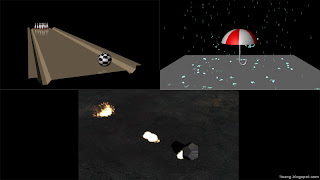
Delving further into Maya dynamics this week introducing soft/rigid bodies with particle systems.

Leave a comment:
0
comments
Maya Dynamics #03
Our third week experimenting with Maya dynamics emitting from surfaces and other particles themselves. Here we created fireworks, an object dispersing, as well as object slowly catching fire with an example of a barrel.


Leave a comment:
0
comments
Maya Dynamics #02
More experiments with Maya dynamics using Curve Emitters and Curve Flow to create a shockwave, fireworks, a particle trail following a motion path as well as intersecting surfaces to create a shore effect around an island. Even with these fairly straightforward effects, one can begin to see the potential of dynamics for further uses.


Leave a comment:
0
comments
Maya Dynamics #01
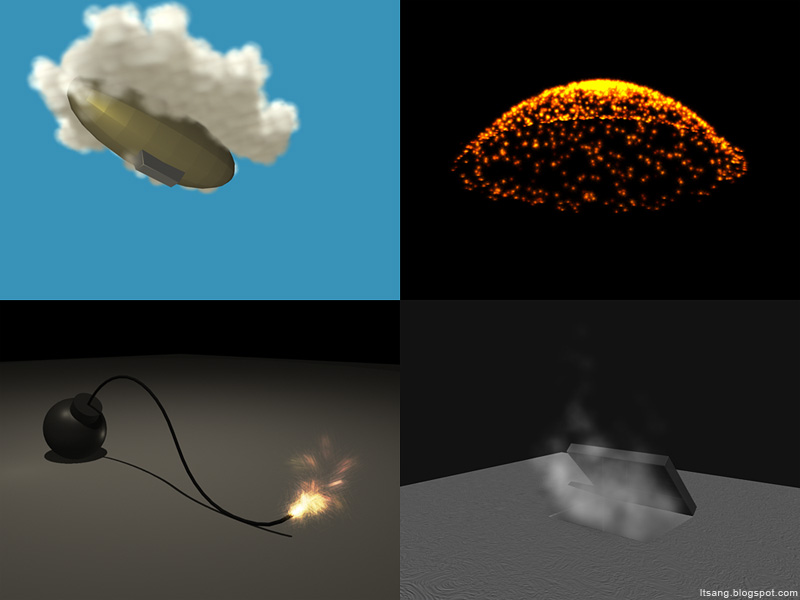
For this set of Maya tutorials, we're beginning to look at dynamics with particles and emitters. Here are a few tests experimenting with the various use of emitters and particles to create a number of effects; from clouds, fuse, an explosion and steam.

Leave a comment:
6
comments
Subscribe to:
Posts (Atom)


